If you’re living in Japan and want to shop on Amazon.co.jp, good news: you don’t need to read Japanese to get started. This guide walks you through everything — switching the site to English, creating your account, entering your address, and paying without losing money to currency fees.
What You’ll Learn in This Article
- How to switch Amazon Japan to English (phone & PC)
- How to create your Amazon Japan account step by step
- How to enter a Japanese address in English
- The best payment cards for foreigners in Japan
- Tips to make shopping easier without speaking Japanese
Step 1: Switch Amazon Japan to English

Before creating an account, switch the site to English first. It makes everything much easier.
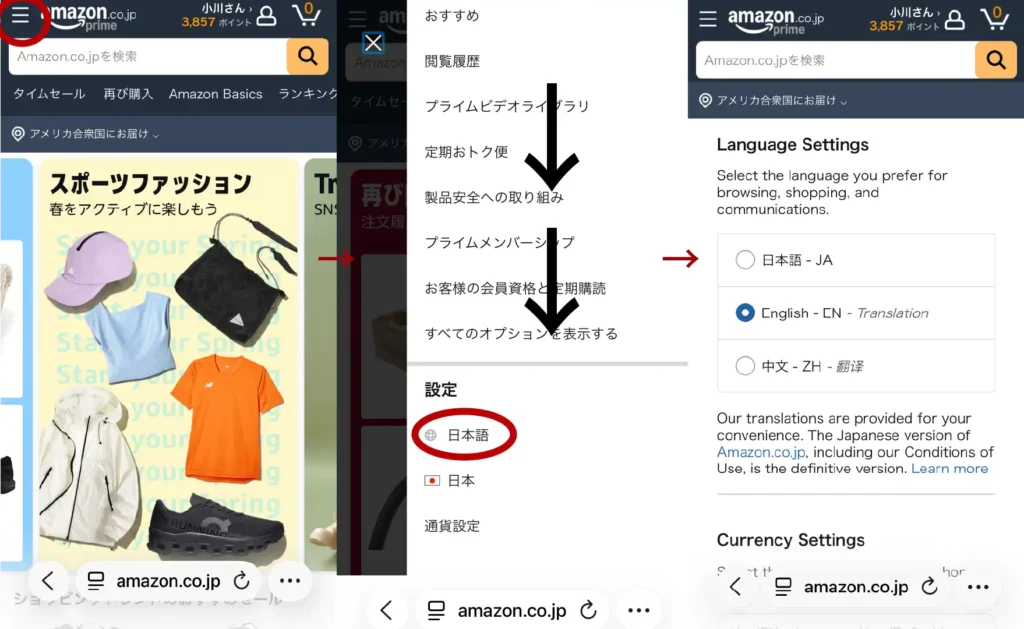
📱 On Smartphone (App or Browser)
- Tap the person icon or hamburger menu (☰) at the bottom or top of the screen.
- Look for “Settings” or a flag icon (🇯🇵).
- Under Language, select “English – EN”.
- Tap “Done” or “Save Changes”.
💻 On PC (Browser)
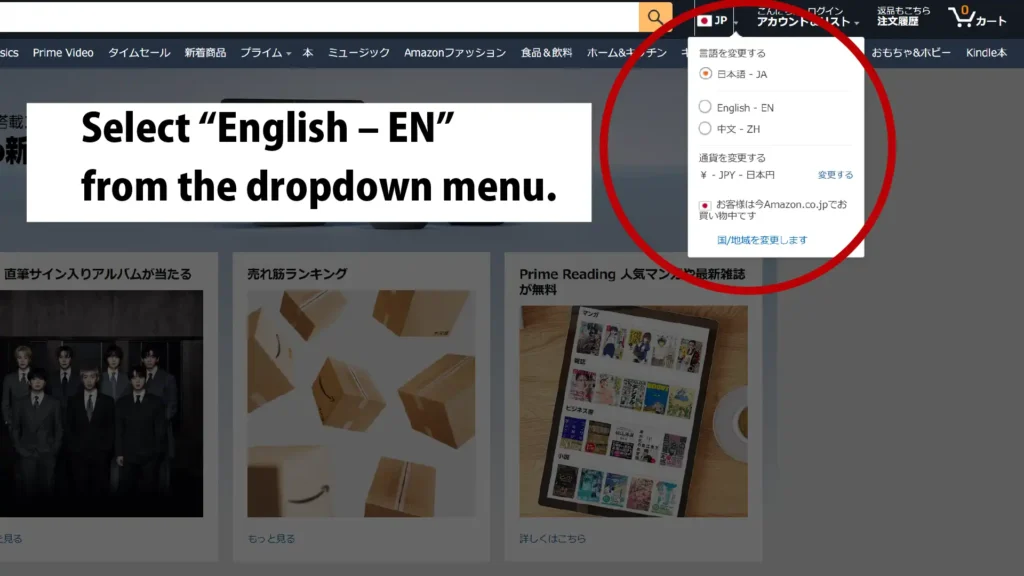
- At the top of the page, hover over the flag icon (🇯🇵) next to the search bar.
- Select “English – EN” from the dropdown menu.
Alternative method: Scroll to the very bottom of any Amazon Japan page. Click the globe icon 🌐 next to “日本語” and switch to “English”.
Step 2: Create Your Amazon Japan Account
Once the site is in English, signing up works the same as any other Amazon.
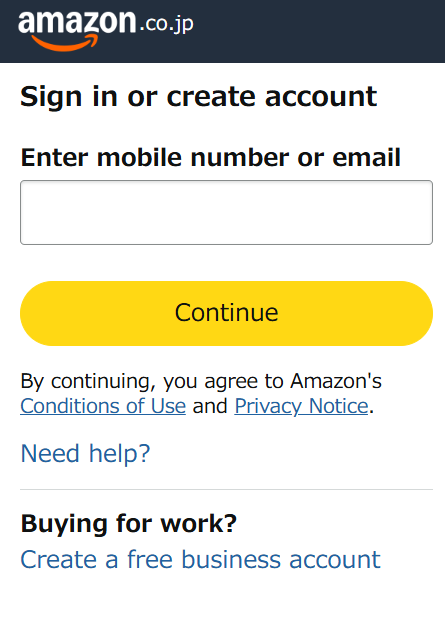
- Click or tap “Hello, sign in” at the top of the page.
- Select “Create your Amazon account”.
- Enter your full name (Roman letters / English is fine), email address, and a password.
- Check your email for a verification code (OTP) and enter it on the next screen.
That’s it — your account is ready.
Step 3: Add Your Japanese Shipping Address
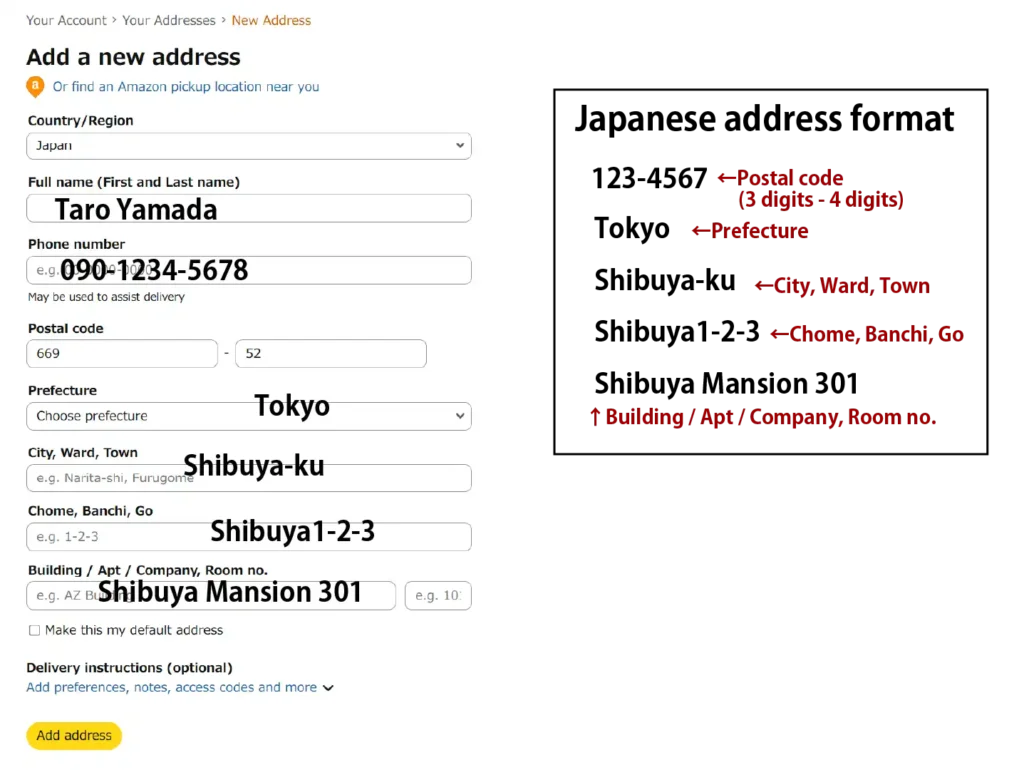
Japanese addresses can be entered in Roman letters (English). Here’s the format to follow:
Step 4: Payment – Best Options for Foreigners
This is where most foreigners in Japan hit a wall. Here’s what you need to know.
⚠️ The Real Problem
The issue isn’t just currency fees — it’s that most Japanese credit cards (Rakuten Card, Amazon Mastercard, etc.) require a Japanese-language application and pass strict credit checks. Without Japanese reading ability, applying is extremely difficult.
Below are the 3 best payment options for foreigners who want to pay in Japanese yen without hassle.
🌍 Can I Use My Home Country Credit Card?
Yes — in most cases it works. If your card is Visa or Mastercard, Amazon Japan will generally accept it. However, there are a few things to watch out for:
Bottom line: Your home country card is fine for occasional purchases. But if you shop on Amazon Japan regularly, switching to a JPY-based card like Wise or Sony Bank Wallet will save you money and avoid headaches.
💳 Option 1: Sony Bank Wallet Recommended
Best for: Long-term residents, workers, and students in Japan.
Sony Bank offers an “English Branch” — a dedicated English-language banking service with English app support and English customer service.
✅ Most reliable option for foreigners with stable residence in Japan.
🏦Sony Bank – English Branchsonybank.jp/en›
💳 Option 2: Wise or Revolut Debit Card
Best for: Newcomers to Japan, or anyone who doesn’t want to open a Japanese bank account yet.
Both Wise and Revolut are multi-currency apps with full English support. You can:
- Load money from your home country bank account or card
- Convert to Japanese Yen (JPY) at very low exchange rates
- Pay on Amazon Japan directly in JPY — no foreign transaction fees
✅ Fastest to set up — ideal if you’ve just arrived in Japan.
💱Wise – Multi-currency debit cardwise.com›🔮Revolut – Global money apprevolut.com›
💳 Option 3: Seven Bank Debit Card (JCB)
Best for: People who frequently use Seven-Eleven ATMs to withdraw cash.
Seven Bank (セブン銀行) offers multilingual account opening (including English) and issues a JCB debit card automatically.
✅ Convenient if you shop both online and in physical stores.
🏪Seven Bank – English Servicesevenbank.co.jp/english›
📋 What You’ll Need to Apply (All Cards)
- Residence Card (在留カード) — must be valid
- Japanese phone number (080 / 090 / 070) — needed for SMS verification
- My Number (マイナンバー) — required for most financial services
Start with Wise if you just arrived in Japan — it takes minutes to set up.
Switch to Sony Bank Wallet once you’ve been in Japan 6+ months for the best long-term experience.
Useful Tips for Shopping on Amazon Japan
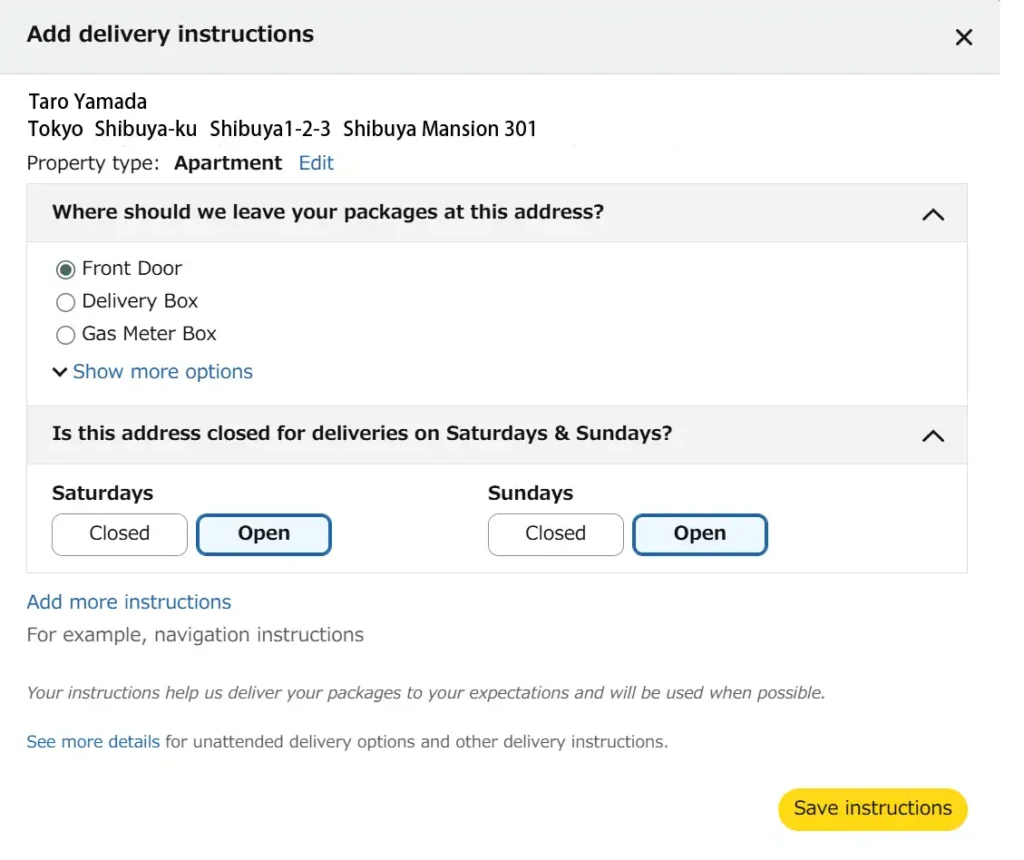
🏠 Use “Leave at Door” (置き配) Delivery
Enable “置き配” (Okihai) in your delivery settings. This tells the courier to leave your package at your door without knocking — no need to interact in Japanese.
🌐 Use Browser Translation for Product Listings
The Amazon Japan interface will be in English, but product descriptions and user reviews are usually written in Japanese by sellers. Use your browser’s built-in translation feature:
- Chrome: Right-click → “Translate to English”
- Safari (iPhone): Tap the AA button → “Translate Website”
🏪 Convenience Store Payment (コンビニ払い)
Amazon Japan supports convenience store payment. However, note that the payment terminal screen inside the store will be in Japanese. Ask a staff member for help if needed.
Summary
Amazon Japan has a huge selection and fast delivery — once you’re set up, it’s one of the most convenient ways to shop in Japan. 🎌
Last updated: March 2026