
I use AdGuard on every device I own and it has made browsing incredibly smooth. When I needed to add more devices to my license, I started looking for the best deal and found that StackSocial.com offers the AdGuard Family Plan as a lifetime license for around $20 USD.
I purchased it via PayPal and the license key arrived without any issues. If you have multiple devices in your household, this is hands-down one of the best deals you can find.
What Is AdGuard?
AdGuard is a powerful ad blocker and privacy protection app compatible with all major operating systems — Windows, Mac, iPhone, Android, and tablets.
- Blocks ads inside apps, not just browsers
- Blocks trackers and protects against malware sites
- Phishing protection
- Parental controls
- DNS-over-HTTPS and other privacy enhancements
Once you install it, browsing without ads becomes the new normal. I have it running on every phone, PC, and tablet I own.
Family Plan Details
| Item | Details |
|---|---|
| Number of devices | 9 devices |
| License type | Lifetime (one-time purchase) |
| Supported OS | Windows / Mac / iPhone / Android / Tablet |
| Delivery | Download (license key via email) |
Where to Buy — StackSocial
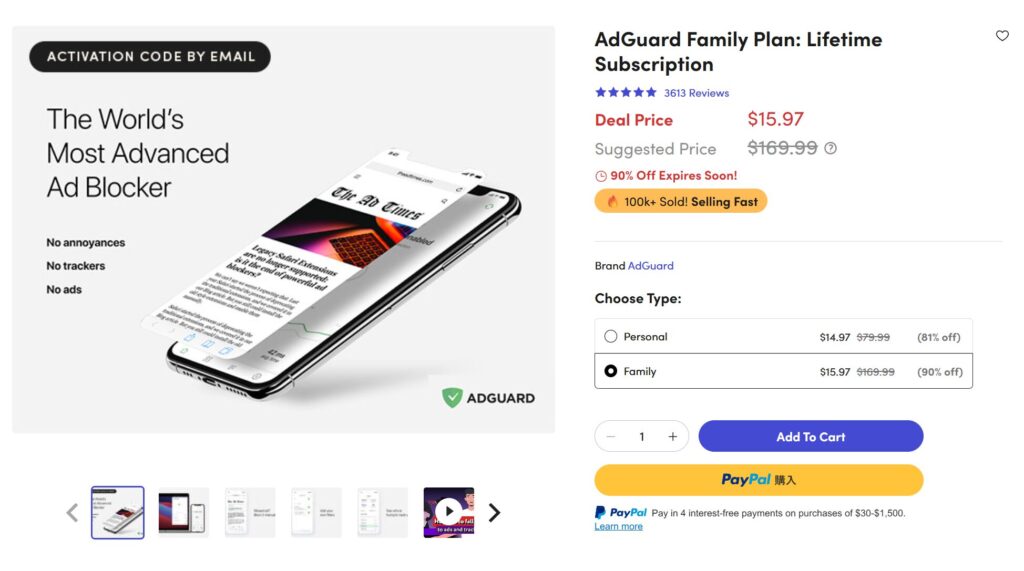
StackSocial is a well-known software deals site where you can pick up the AdGuard Family Plan lifetime license for around $16 USD — a fraction of the regular retail price.
- PayPal accepted (no credit card required)
- License key delivered instantly to your email after purchase
- Genuine license — activated without any problems
The price may vary slightly depending on exchange rates, but it is consistently much cheaper than buying directly.
How to Purchase on StackSocial
- Open the StackSocial product page
- Click Add to Cart → Checkout
- Create a free account with your email address
- Select PayPal as your payment method and complete checkout
- After purchase, go to My Orders in your account to retrieve the license key
- Install AdGuard on your device and enter the key to activate
The process is straightforward. PayPal makes it easy to pay in your local currency without sharing card details.
How to Set Up AdGuard
Once you have your license key, AdGuard’s official Knowledge Base has detailed setup guides for every platform:
📖 AdGuard Knowledge Base — covers installation, filter configuration, DNS settings, and troubleshooting for Windows, Mac, Android, iOS, and more.
If you want to jump straight to installation: How to install AdGuard
Summary
For anyone with multiple devices to protect, the AdGuard Family Plan on StackSocial is one of the best value software deals available.
- ✅ 9-device lifetime license
- ✅ Around $16 USD — excellent value
- ✅ PayPal accepted
- ✅ Genuine key, activated successfully
Highly recommended for families and gadget enthusiasts with more devices than licenses.